B2B Procurement Guide
PN-2000FC850 Humidifier - Instructions for Use (IFU): Setup, Alarms, Cleaning & Specs
The complete instructions for use of the PN-2000FC850 heated wire humidifier: intended use, specs, temperature modes, alarms, setup, cleaning - the same IFU that ships in every box.
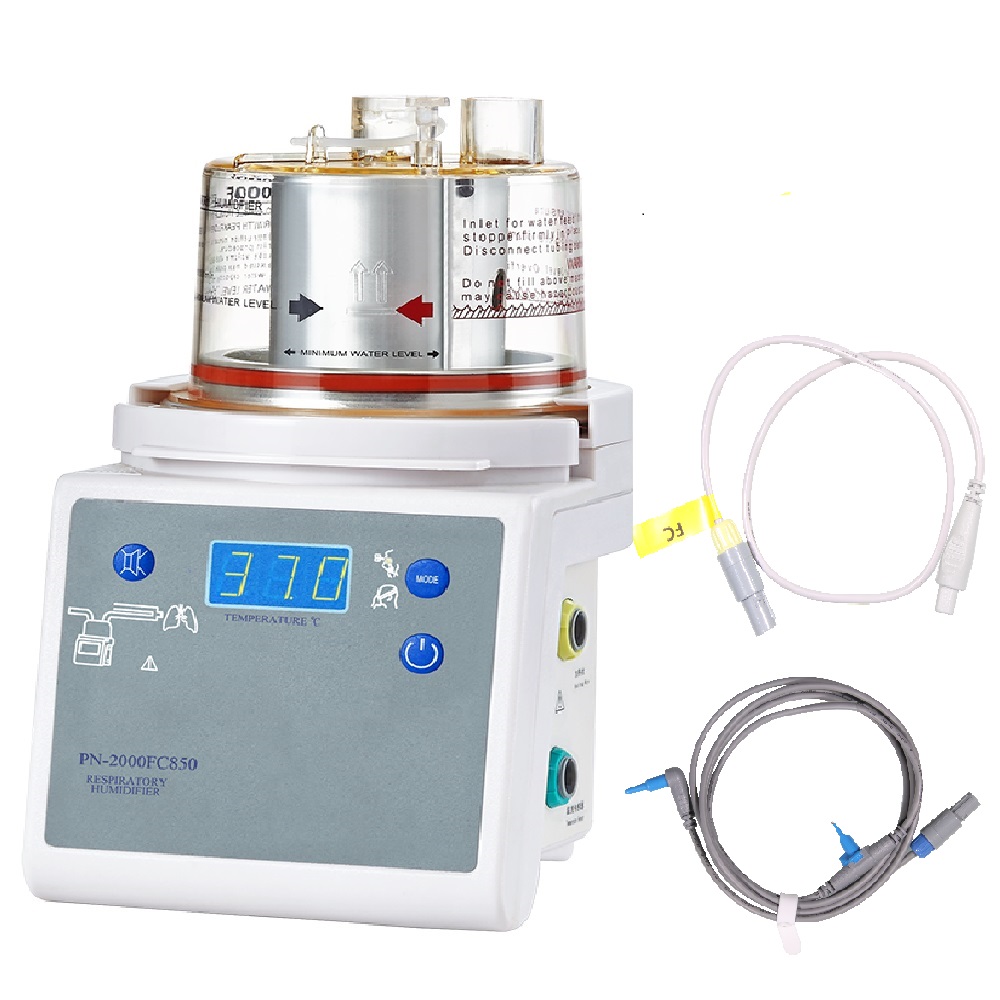
This is the complete Instructions for Use (IFU) of the PN-2000FC850 servo-control heated wire humidifier - the same document that ships in every box, published online so biomedical engineers, procurement teams and clinical staff can review it before purchase. The printable PDF is available on request via the contact form.
Section 1: Intended Use and Users' Responsibility
The respiratory humidifier is used to warm and humidify gases delivered to patients requiring mechanical ventilation, positive pressure breathing assistance, or other medical gases. The device must be operated by trained staff under the guidance of this manual, connected to a power supply meeting the technical specifications (voltage fluctuations above 10% require an AC regulator), placed at least 1 m from flammable gases, never used without a gas source or in oxygen-rich environments, and positioned lower than the patient's respiratory tract. Broken, missing or contaminated parts must be replaced immediately; unauthorized modification places responsibility for resulting damage on the user.
Section 2: Technical Regulation and Classification
The FC850 complies with IEC 60601-1, is Class I equipment with Type BF applied parts, non-AP/APG safe degree, continuous operating mode. It features automatic (humidity compensation) and non-automatic temperature control, heater-wire and non-heater-wire modes, invasive and non-invasive modes, and over-heat protection, matching with heated-wire circuits.
Section 3: Specifications
Electrical
Supply 220 V / 110 V, 50/60 Hz; supply current 2.0 A max at 220 V / 4.0 A at 110 V; heater plate 150 VA / 260 VA; heater wire supply 22 plus or minus 5 V, 2.73 A max; heater plate thermal cutout below 95 degrees C.
Airway temperature ranges
Invasive mode with heated-wire circuit: 40 plus or minus 2 degrees C. Invasive with non-heated circuit: 37 plus or minus 2 degrees C. Non-invasive with heated-wire circuit: 34 plus or minus 2 degrees C. Non-invasive without heated circuit: 31 plus or minus 2 degrees C.
Chamber outlet temperature
Invasive mode with heated-wire circuit: 37-42 degrees C (error plus or minus 2 degrees C).
Alarms
Low airway temperature: flashing indicator with audible alarm 15 minutes after startup or mode switch if below 35 degrees C (heated circuit, invasive) or 29 degrees C (non-invasive), or below 29.5 / 26 degrees C with non-heated circuits. Chamber outlet low temperature: below 34 degrees C (invasive) or 28 degrees C (non-invasive). High temperature: chamber outlet above airway temperature with airway above 41 degrees C, or airway above 43 degrees C. Temperature sensor fault: '---' display with alarm. Heater-wire fault: flashing indicator with alarm.
Noise, output and working conditions
Operating noise at most 50 dB(A); alarm tone at least 60 dB(A) at 1 m. Humidification output: at least 33 mg/L (invasive), at least 10 mg/L (non-invasive). Recommended conditions: ambient 18-28 degrees C, inlet gas 18-25 degrees C, relative humidity at most 80% without condensation, 860-1,060 hPa.
Section 4: Panel Introduction
Power button runs an internal diagnostic at power-on (display shows '850' after the beep, defaulting to invasive mode). The Mode button switches invasive/non-invasive. The Mute button silences alarms for 2 minutes; pressing Mute again displays chamber and airway temperatures; holding Mute plus Mode opens the working menu. Alarms cover airway temperature deviation, chamber outlet deviation, sensor faults and heater-wire faults, each with dedicated flashing indicators.
Section 5: Connection (5 steps)
1. Slide the humidification chamber onto the humidifier base and connect the breathing circuit. 2. Connect the temperature probe plug to the blue socket until it clicks. 3. Insert the chamber and airway probes into the breathing circuit, securing the chamber probe in its key-way. 4. Connect the heater-wire adaptor plug to the yellow socket until it clicks. 5. Connect the adaptor's other end(s) to the circuit socket(s). After power-on the system defaults to invasive mode.
Section 6: Operating Modes
Heater-wire operation maintains the airway set point (invasive 37 degrees C, non-invasive 31 degrees C) by servo-adjusting wire power. Non-heater-wire operation maintains the set point through the heater plate alone, using a water-trap circuit for condensate. Circuit identification ('cct' in the working menu) detects 'S' = standard heater-wire adaptor connected. Chamber set point adjusts in 0.1 degrees C resolution.
Section 7: Cleaning and Disinfection
Shell: disconnect power, clean with a damp cloth (no benzene, ether or trichloroethylene); disinfect with 75% medical alcohol, keeping liquids out of the unit. Chamber and connectors: remove the chamber by pressing its front retainer; disinfect with 1:500 chlorine-containing disinfectant for 30 minutes. Chambers and adaptors are not autoclavable. Power cable: clean with a wet cloth and soft brush, disinfect with 75% medical alcohol - never immerse.
Section 8: Working Menu
Press Mute plus Mode for 1 second to enter the working menu; it cycles automatically to 'End'. Menu items include circuit identification ('S' = standard heater-wire adaptor), chamber set point (0.1 degrees C resolution), and alarm configuration - covering circuit type, chamber set point, humidity compensation, heater-plate power, flow settings and alarm limits.
Section 9: Maintenance, Chamber Care and Packing
Keep the chamber base tray and heating plate clean and unworn. Used chambers contact the patient's respiratory tract directly - after cleaning and disinfection, dispose of them through a qualified processor per hospital procedure. Store the unit dry; after improper storage, run it for at least 8 hours before use. Packing list: respiratory humidifier x 1, humidification chamber x 1, temperature sensor x 1, heater-wire adaptor x 1, user guide x 1, disposable breathing circuit (optional).
Questions about the FC850?
The printable PDF version of this manual, the product catalog and FOB/DDP quotations are available from the factory - reach the team at Pigeon Medical through the contact form on this site or via the email and phone listed on the Contact Us page.